 Run
agy remote-control start + Home Screen PWARegistering the headless CLI LaunchAgent daemon keeps your Mac reachable at antigravity.google.com every time you log in without leaving a Terminal window open. Pair it with cloud Remote Agents on Google AI Pro ($19.99) for jobs that run when your laptop lid is closed.
agy remote-control startmacOS LaunchAgentYes, Google Antigravity has a full web app at antigravity.google.com that lets you remote directly into your Mac from an iPhone, iPad or second laptop. No Tailscale setup, port forwarding or SSH keys are required: Google bridges your browser to your local machine through your Google Account.
Even better, Antigravity splits remote work into two clear architectures: Remote Control (which runs on your own Mac's hardware, uncommitted Git worktrees and localhost servers) and Remote Agents (which run in Google's cloud sandbox when your laptop is asleep).
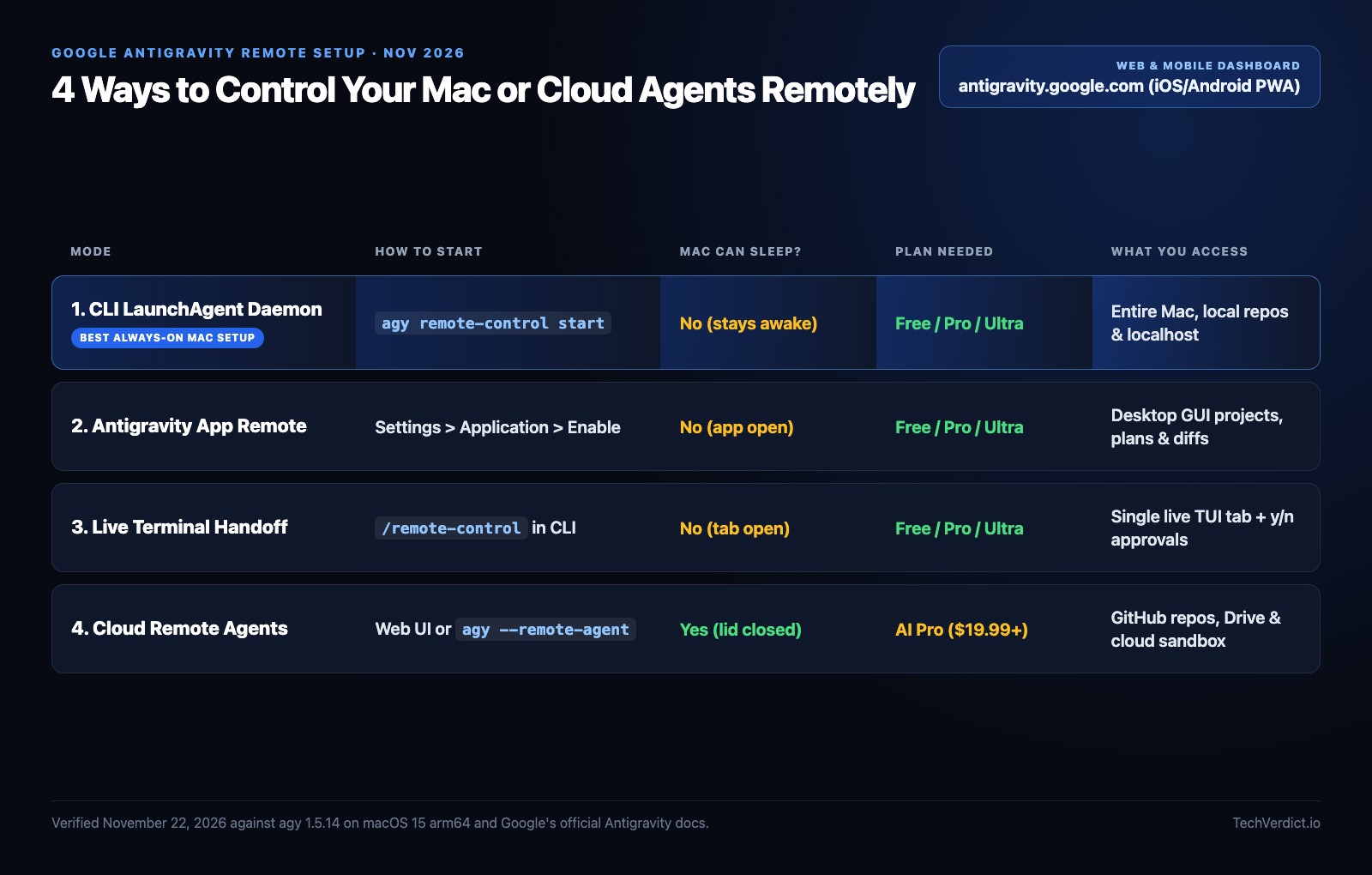
All 4 Antigravity remote modes compared
| Mode | Where code runs | Mac can sleep? | Plan required | Best for |
|---|---|---|---|---|
CLI Daemon (agy remote-control start) | Your local Mac | No | Free, Plus, Pro, Ultra | Always-on remote access with zero open windows |
| Desktop App Remote Control | Your local Mac | No | Free, Plus, Pro, Ultra | GUI projects, visual artifacts and diff review |
Interactive CLI (/remote-control) | Your local Mac | No | Free, Plus, Pro, Ultra | Handing off one live terminal build to your phone |
| Cloud Remote Agents | Google cloud VM | Yes (lid closed) | AI Pro ($19.99) or Ultra | GitHub repo tasks while traveling or offline |
Checked November 22, 2026 against agy 1.5.14 and Google's Remote Control and Remote Agents docs.
Method 1: Enable Remote Control in the Antigravity Mac App (60 seconds)
If you already keep the graphical Antigravity App open on your Mac, turning on browser access takes four clicks:
- Open Antigravity on your Mac and press
Cmd + ,(or click Settings at the bottom of the left sidebar). - Select Application and toggle Enable Remote Control to On.
- Give your Mac a clear Device Name (such as
cam-mac-studioorm5-macbook-pro). - On your phone or second laptop, open antigravity.google.com signed in to the same Google Account, open the instance switcher, and pick your Mac.
Make sure macOS sleep is disabled while plugged into power (or use Amphetamine / caffeinate), because if your Mac goes to sleep it drops offline until woken.
Method 2: Always-on headless Mac daemon (agy remote-control start)
If you don't want to leave the Electron desktop window or an open Terminal tab running all day, the agy CLI includes a native background service that registers as a macOS LaunchAgent:
agy remote-control start --name "cam-mac"Starts immediatelyagy remote-control statusShows host ID~/Library/Logs/antigravity-cli-daemon.logAuto-restarts on crashagy remote-control stopClean removalantigravity.google.com? That's expected when both the Desktop App and the CLI daemon are enabled. In ~/.gemini/config/config.json, remoteControlHostname names the Desktop App while cliRemoteControlHostname names the CLI daemon.Method 3: Hand off a live terminal session (/remote-control)
Suppose you're halfway through a refactor in Terminal and need to step out for coffee. Type /remote-control inside your running agy prompt (or launch with agy --remote-control). Antigravity opens a session-scoped reverse tunnel and prints a direct URL (https://antigravity.google.com/r/<instance-id>?p=c%2F<conversation-id>).
Both screens stay synchronized in real time: prompts sent from your iPhone appear live inside your Mac's terminal TUI, and when the agent pauses on a y/n command confirmation or clarifying question, you can tap approve right on your phone. Run /remote-control off or exit the CLI to close the tunnel immediately.
Method 4: Cloud Remote Agents (works when your MacBook is asleep)
On Google AI Pro ($19.99/mo) and Google AI Ultra ($99.99/mo) with a personal Google Account, you can also run agents in Google's cloud rather than on your Mac. Start from antigravity.google.com (Create Project) or from your shell with agy --remote-agent (requires CLI 1.4.12+).
Attach OAuth-connected GitHub repositories, Google Drive Docs/Sheets, or uploaded files (up to 100 MiB per project). Because the workspace runs inside Google's infrastructure, you can slam your MacBook lid shut and check the finished PR from your phone an hour later. Note that local-only tools (such as your Mac's local MCP servers, local SKILL.md folders and /voice mode) only run in Remote Control, not in cloud Remote Agents.
How to get iPhone & Android push notifications
Google hasn't shipped a standalone iOS App Store binary for Antigravity yet, because antigravity.google.com is built as an installable Progressive Web App (PWA). On iPhone, open antigravity.google.com in Safari, tap Share > Add to Home Screen, sign in, and allow notifications: your phone will buzz whenever a background agent finishes its task or pauses for tool approval.
Which remote workflow should you use?
agy remote-control start (LaunchAgent)/remote-control live handoff link
antigravity.google.com
Frequently asked questions
What is the URL for the Google Antigravity web app?
The official Google Antigravity web dashboard is https://antigravity.google.com. Sign in with the same Google Account used on your Mac to switch between your connected local machines (Remote Control) and Google-hosted cloud workspaces (Remote Agents).
Does my Mac need to stay awake for Antigravity Remote Control?
Yes for Remote Control, because execution runs directly on your Mac's local filesystem and dev servers. If you want agents to keep running when your MacBook lid is closed or asleep, use Remote Agents (agy --remote-agent or New Remote Project on antigravity.google.com), which runs inside Google's cloud on Google AI Pro ($19.99) and Ultra ($99.99).
Is there a Google Antigravity iPhone or Android app?
There is no separate App Store download yet, so mobile access works through https://antigravity.google.com in Safari or Chrome. Adding antigravity.google.com to your Home Screen installs it as a Progressive Web App (PWA) and unlocks mobile push notifications when tasks finish or pause for input.
What is the difference between agy --remote-control and agy remote-control start?
Running agy --remote-control (or /remote-control inside an active session) opens a temporary reverse tunnel for that single terminal tab that closes as soon as you exit. Running agy remote-control start registers a persistent macOS LaunchAgent daemon that stays reachable in the background across reboots and logouts with no Terminal window open.
Which Google AI plan do you need for Antigravity Remote Control and Remote Agents?
Remote Control into your own Mac works on Free, Google AI Plus ($4.99), Google AI Pro ($19.99) and Google AI Ultra ($99.99), though Free and Plus only run Gemini 3.8 Flash. Cloud-hosted Remote Agents and Gemini 4 Neon require a personal Google Account on Google AI Pro ($19.99/mo) or Google AI Ultra ($99.99/mo).