Our verdict: 32GB of unified memory is the minimum worth buying for serious local AI, and 64GB is the comfortable buy. On a PC, a 24GB GPU covers the 27B to 31B class. The newest 119B to 122B models start at 96GB.
16GB runs a useful current model. But the best models that still make sense on consumer hardware are 27B to 35B, and they need more room than that.
 Qwen
Qwen
 Gemma 4
 gpt-oss
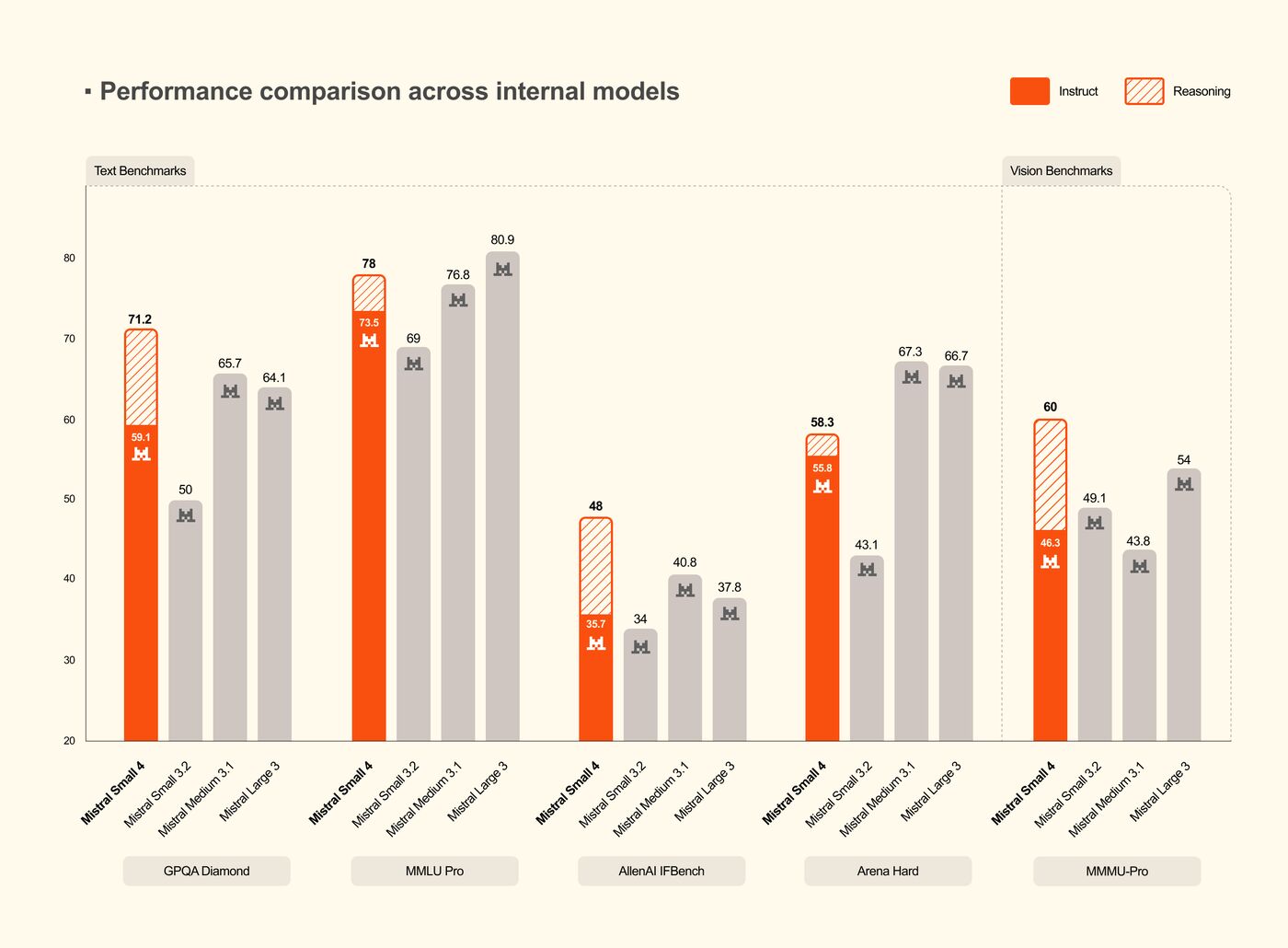
 Mistral Small 4
 Step 3.7 Flash
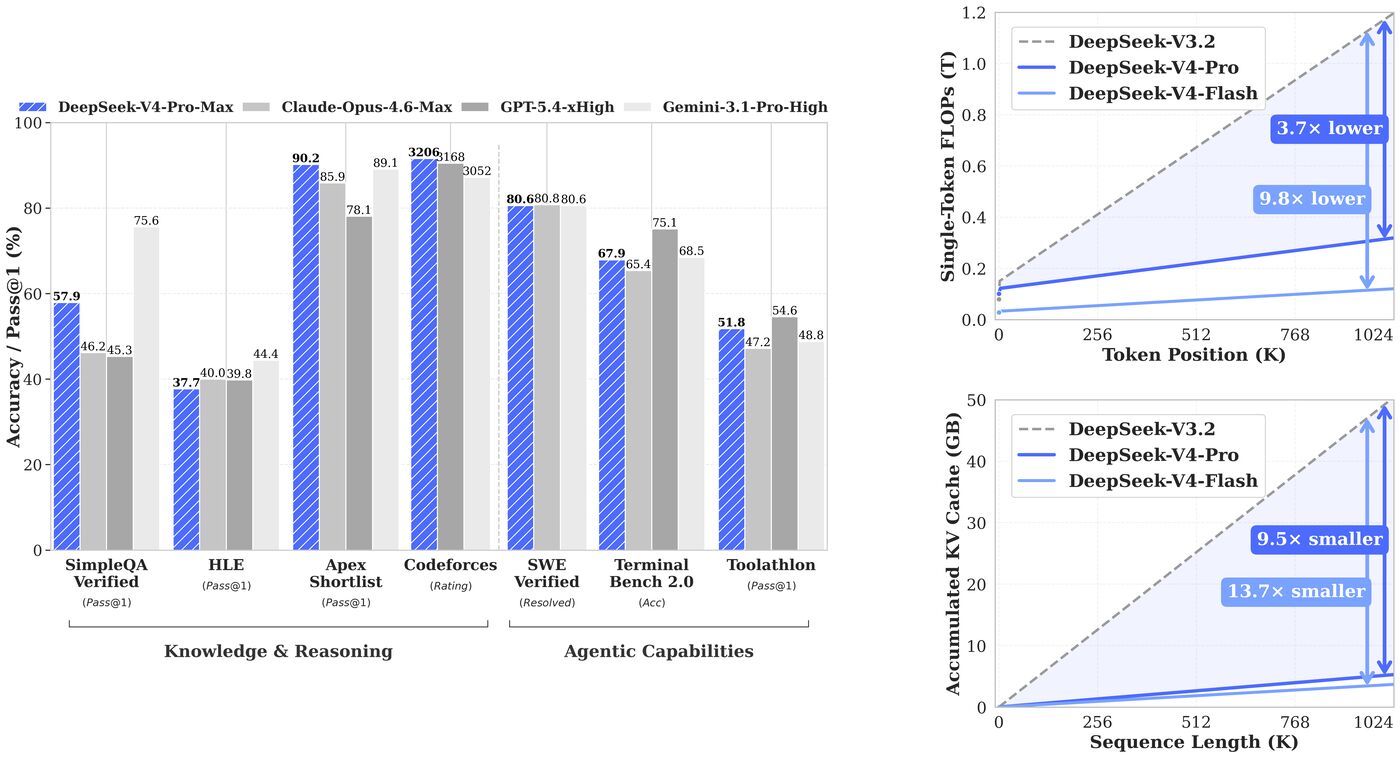
 DeepSeek V4 Flash
How much memory each model needs
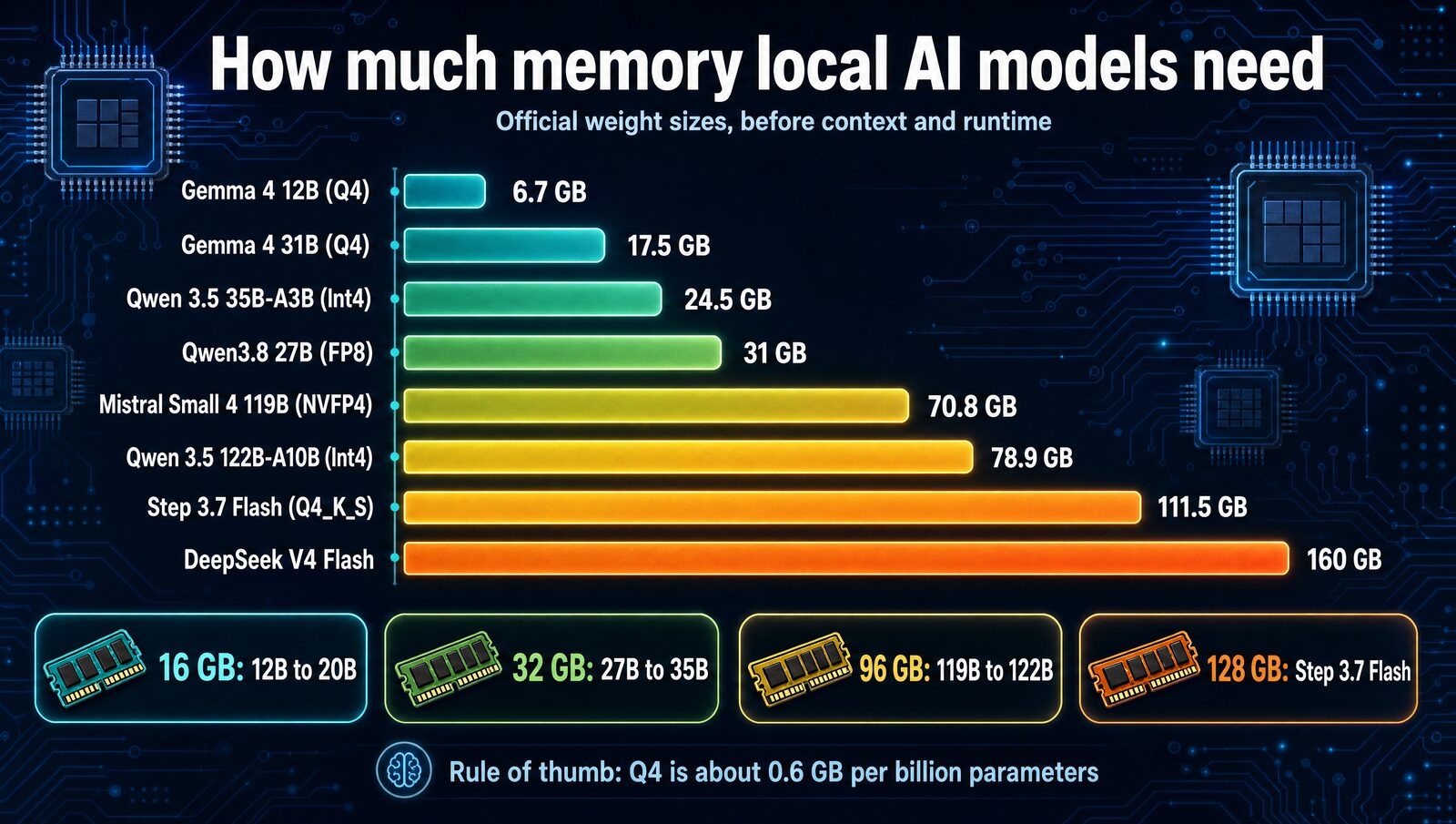
The 4 memory tiers at a glance
16GB- Fits strong 9B to 20B low-bit models
- gpt-oss-20b and Qwen 3.5 9B also work
- Speed: fine for chat with modest context
The catch: no clean fit for the 27B to 35B class.
24GB to 32GB- Fits 27B to 35B models at about 4-bit
- Gemma 4 31B and Qwen 3.6 35B-A3B too
- Speed: 35B-A3B is quickest, about 3B active
The catch: on a 24GB GPU, keep context to 8K to 16K.
64GB- Higher precision and much longer context
- Older 70B-class models at Q4
- Speed: no memory pressure with your IDE open
The catch: 119B to 122B models still don't fit.
96GB to 128GB- Mistral Small 4 119B at 70.8GB
- Step 3.7 Flash needs 128GB
- Speed: MoE, only about 10B active per token
The catch: DeepSeek V4 Flash wants 192GB or more.
RAM requirements by model class
| Memory tier | What realistically fits | Current examples | Verdict |
|---|---|---|---|
| 8GB | Small 2B to 4B models | Gemma 4 E2B; E4B on 8GB dedicated VRAM | Learning and light utility only |
| 16GB | Strong 9B to 20B low-bit models | Gemma 4 12B, gpt-oss-20b | Real entry point |
| 24GB dedicated VRAM | Leading 27B to 31B models at about 4-bit | Qwen3.8 27B, Gemma 4 31B | Excellent PC entry tier |
| 32GB unified / 32GB VRAM | Leading 27B to 35B models at about 4-bit | Qwen3.8 27B, Qwen 3.6 35B-A3B, Gemma 4 31B | Minimum serious purchase |
| 64GB | 27B to 35B at higher precision or long context | Qwen3.8 27B and Gemma 4 with fewer compromises | Best consumer sweet spot |
| 96GB | Current 119B to 122B MoE models at true 4-bit | Qwen 3.5 122B-A10B, Mistral Small 4 119B | Flagship local workstation |
| 128GB | 196B-class efficient MoE models at Int4 | Step 3.7 Flash | New capability tier |
| 192GB+ | Very large 284B-class models with careful quantization | DeepSeek V4 Flash | Specialist hardware, not a normal PC |
These are practical single-user tiers, not bare download sizes. They leave room for the operating system, runtime, KV cache and a useful context window. Sizing comes from official model cards and weight files plus conservative headroom, not hands-on benchmarks.
What runs where
| Model | 16GB | 24GB VRAM | 32GB | 64GB | 96GB | 128GB |
|---|---|---|---|---|---|---|
| Gemma 4 12B (Q4) | ✓ | ✓ | ✓ | ✓ | ✓ | ✓ |
| gpt-oss-20b | ✓ | ✓ | ✓ | ✓ | ✓ | ✓ |
| Qwen3.8 27B (Q4) | ✗ | ✓ | ✓ | ✓ | ✓ | ✓ |
| Gemma 4 31B (Q4) | ✗ | ✓ | ✓ | ✓ | ✓ | ✓ |
| Qwen 3.6 35B-A3B (Q4) | ✗ | Tight | ✓ | ✓ | ✓ | ✓ |
| Qwen3.8 27B (FP8) | ✗ | ✗ | ✗ | ✓ | ✓ | ✓ |
| gpt-oss-120b | ✗ | ✗ | ✗ | Tight | ✓ | ✓ |
| Qwen 3.5 122B-A10B (Int4) | ✗ | ✗ | ✗ | ✗ | ✓ | ✓ |
| Step 3.7 Flash (Q4_K_S) | ✗ | ✗ | ✗ | ✗ | ✗ | ✓ |
| DeepSeek V4 Flash | ✗ | ✗ | ✗ | ✗ | ✗ | ✗ |
Tight means it loads only with a smaller quantization, CPU offload or almost no room for context. DeepSeek V4 Flash starts at 192GB.
How the memory math works
Two things fill memory: the weight file and everything around it. The runtime, buffers, vision or audio parts and the KV cache that holds your conversation all need space too, so an advertised 128K or 256K context won't fit on most consumer machines.
| Format | Memory per billion parameters | A 27B model |
|---|---|---|
| Q4 (GGUF Q4_K_M) | About 0.6GB | About 17GB |
| Q8 | About 1GB | About 27GB |
| BF16 | About 2GB | About 54GB |
Q4 is about half the size of Q8 and about 75% smaller than BF16. On a Mac, unified memory is shared by CPU and GPU, so macOS and your apps take part of the same pool. On a PC, VRAM sets how much runs at full GPU speed. 16GB of VRAM plus 32GB of system RAM isn't a 48GB GPU, because CPU offload is much slower.
16GB: Gemma 4 12B
Google lists a 6.7GB Q4 load for Gemma 4 12B, before software and context, and sizes it for consumer devices. That leaves room for a sensible context window and a normal desktop.
OpenAI says gpt-oss-20b runs within 16GB in its native low-bit format, and Qwen 3.5 9B keeps even more headroom. If you already own 16GB, use it. If you're buying for local AI, move up to 32GB.
24GB to 32GB: Qwen3.8 27B
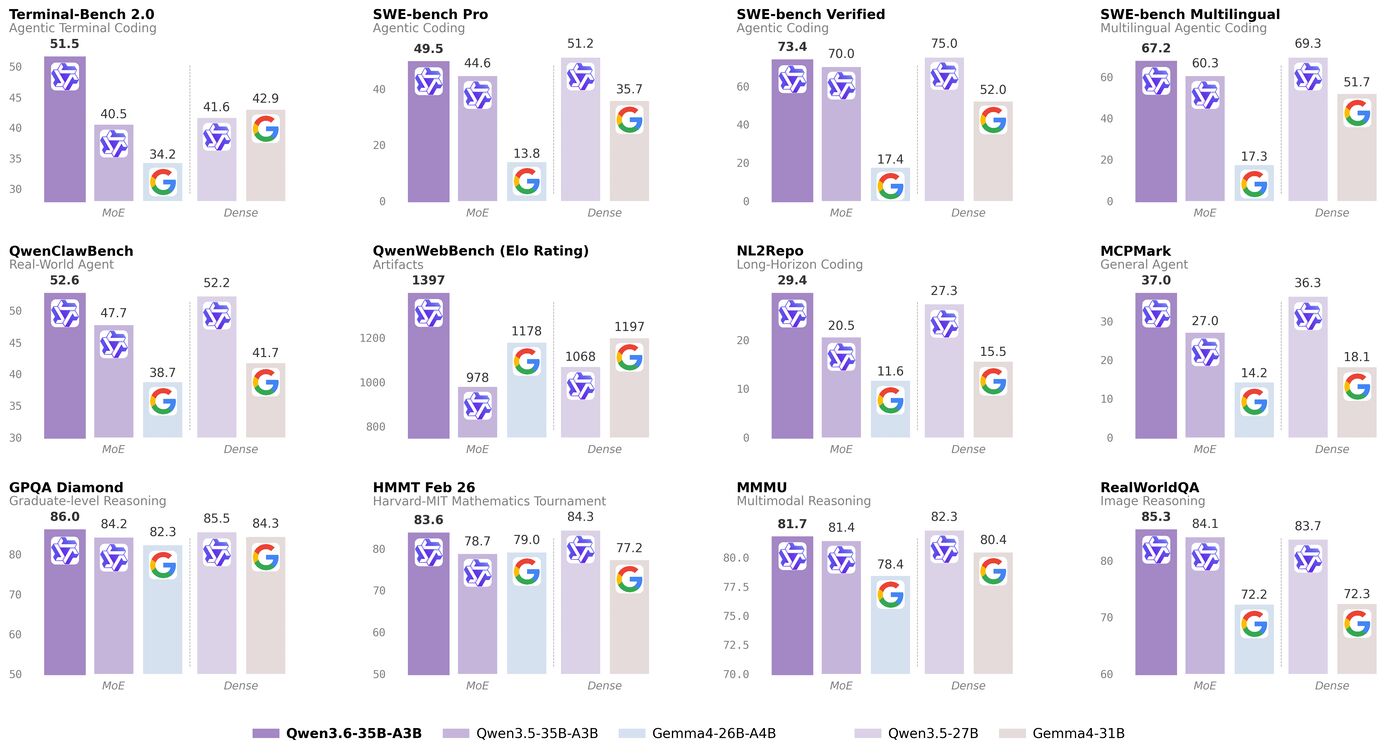
Qwen3.8 27B, released in August 2026, is our top free local pick. A Q4 file is roughly 17GB before cache, so it fits a 24GB GPU with 8K to 16K of context. Gemma 4 31B is the other strong fit at 17.5GB.
Qwen 3.6 35B-A3B is the speed pick, since it activates only about 3B parameters per token. It's tighter, though: Qwen's comparable 3.5 Int4 checkpoint is about 24.5GB, so a 24GB card needs a smaller quant or some offload. At 32GB of unified memory, all three run without treating every browser tab as a threat.
64GB: the comfortable sweet spot
64GB doesn't unlock a new model class. It removes compromises: Q8 or other higher-precision quants, much longer context, and room for your IDE and browser. Qwen's official FP8 checkpoint of Qwen3.8 27B is about 31GB, which leaves plenty of space.
It's also a good home for older 70B-class models at Q4. Don't count on gpt-oss-120b, though: its files leave almost no room for cache, and OpenAI targets a single 80GB GPU.
96GB to 128GB: the flagship MoE tier
Qwen 3.5 122B-A10B's official Int4 checkpoint is about 78.9GB, and Mistral Small 4 119B's NVFP4 checkpoint is about 70.8GB. Both overflow 64GB before a single prompt, so 96GB is the first clean tier.
Step 3.7 Flash, a 198B MoE with about 11B active, sets the 128GB tier. StepFun lists 111.5GB of Q4_K_S weights plus about 7GB of overhead, requires at least 120GB and recommends 128GB of unified memory.
192GB and up: DeepSeek V4 Flash
DeepSeek V4 Flash has 284B total parameters and 13B active. Its official mixed FP4/FP8 checkpoint is roughly 160GB before runtime, so 192GB is the practical start. The newer V4.1 Flash has about 510GB of weights and is server-only, as are GLM-5 (about 744B) and DeepSeek V4 Pro.
What about 8GB and CPU-only PCs?
8GB runs Gemma 4 E2B for basic summaries and offline chat. Google estimates 4.5GB for E4B at Q4 before software, so E4B suits an 8GB GPU better than an 8GB Mac. Skip 8GB if local AI is a reason you're buying.
CPU-only PCs may load a quantized model in 32GB or 64GB, but ordinary DDR memory generates far more slowly than a modern GPU or Apple's unified memory.
Which tier do you have?
The verdict
Buy 32GB as the minimum for serious local AI in 2026, and 64GB if you'll use it daily. For the 119B to 122B class, start at 96GB, and pick 128GB for Step 3.7 Flash.
Verified sizing sources
- Google's Gemma 4 memory table: Q4 loads of 6.7GB (12B), 14.4GB (26B-A4B) and 17.5GB (31B), excluding software and KV cache.
- OpenAI's gpt-oss announcement: 16GB for gpt-oss-20b, a single 80GB GPU for gpt-oss-120b.
- Qwen3.8 27B card and its FP8 checkpoint (about 31GB).
- Qwen 3.6 35B-A3B card and the Qwen 3.5 Int4 checkpoint (about 24.5GB).
- Step 3.7 Flash card: 120GB minimum, 128GB recommended for llama.cpp.
- DeepSeek V4 Flash card: 284B total, 13B active.
FAQ
Is 16GB enough RAM for a local LLM in 2026?
Yes. A 16GB machine can run a useful current model such as Gemma 4 12B at 4-bit quantization or gpt-oss-20b in its native low-bit format. It isn't enough for the strongest 27B to 35B consumer-local models with comfortable context and operating-system headroom.
Is 32GB RAM enough for the best local LLMs?
Yes for the best models that are practical on consumer hardware. A 32GB unified-memory machine can run 4-bit versions of Qwen3.8 27B, Qwen 3.6 35B-A3B, and Gemma 4 31B with useful context. On a PC, 24GB of dedicated VRAM cleanly covers the 27B to 31B class; a 35B model needs a smaller quantization, partial CPU offload, or a 32GB GPU.
Should I buy 32GB or 64GB for local AI?
Buy 32GB if cost matters and you're happy with 4-bit 27B to 35B models. Buy 64GB if this will be a daily local-AI workstation: it gives you more context, higher-precision quantizations, room for coding tools and browsers, and fewer memory-pressure compromises.
How much memory do 119B to 122B local models need?
Current models such as Qwen 3.5 122B-A10B and Mistral Small 4 119B need roughly 70GB to 79GB for their official low-bit checkpoints before context, runtime, and operating-system overhead. Treat 96GB as the minimum clean tier and 128GB as the comfortable tier.
Do active parameters determine how much RAM an MoE model needs?
No. Active parameters mainly affect compute per token. The complete set of model weights still has to be stored. A 122B-A10B model activates about 10B parameters at a time but still needs memory for roughly 122B parameters.