Your photographer gets the posed shots. Your guests get everything else: the speeches from table nine, the dance floor at midnight, your grandmother laughing. A wedding photo sharing app pulls all of it into one gallery, usually through a single wedding photo QR code on the tables.
Our pick: Warpbin is the best wedding photo app for most couples. Guests upload full-quality photos and videos with no app and no account, every feature comes with every plan, and one wedding costs $19. GuestCam is the pick for a year of storage and an audio guestbook, and Google Photos is the free fallback.
 Google Photos
Price vs storage at a glance
Three things decide the price: how many photos you can store, how long guests can upload, and how long the gallery stays online. Warpbin meters storage, Kululu counts uploads, and POV charges by guest count.
The 5 apps at a glance
- No app, no account, full quality
- Every feature on every plan
- Free demo with no email or card
The catch: 90 active days on the $19 plan, then it's deleted.
- Unlimited guests, photos and videos
- 6-month uploads, 12-month storage
- Audio guestbook included
The catch: no free plan listed.
- Live slideshow on every plan
- Photo wall with its own QR code
- Moderation and welcome forms on Pro
The catch: Plus caps you at 500 uploads.
- A disposable camera on every phone
- You set shots per guest and reveal time
- Free for up to 10 guests
The catch: priced by guest count.
Google Photos- Shared album link or QR code
- Anyone with the link can add photos
- Already on most phones
The catch: no guestbook, branding or event controls.
Prices and limits
Prices checked October 23, 2026, on each company's own pricing page. List prices shown; some vendors run temporary discounts.
| App | Free option | Paid plans | Storage or uploads | How long it lasts |
|---|---|---|---|---|
| Warpbin | Demo: ~30 photos, 100 MB, 3 days (500 MB, 14 days with email) | $19 one-time; $49 one-time; Pro $9.95/mo | 10 GB (~3,000 photos); 50 GB; Pro 10 GB + $0.25/GB/mo | 90 or 365 active days; Pro never expires |
| Kululu | 100 uploads, 24-hour upload window, kept 7 days | Plus $39; Pro $99 (one-time) | 500 uploads; unlimited | Kept 3 months; 1 year |
| GuestCam | None listed | Standard $49; Premium $97 (one-time) | Unlimited photos and videos | 12 months; 14 months |
| POV | Up to 10 guests | $34.99 (100 guests), $64.99 (175), $89.99 (250) | Not stated | Not stated |
| Google Photos | Free shared album | None needed | Not stated for shared albums | Not stated |
What each one includes
| Feature | Warpbin | Kululu | GuestCam | POV | Google Photos |
|---|---|---|---|---|---|
| No app download for guests | ✓ | ✓ | ✓ | App Clip | – |
| Original-quality files | ✓ | Paid plans | ✓ | – | – |
| Live slideshow | ✓ | ✓ | ✓ | Add-on | – |
| Guestbook | ✓ | – | Audio | – | – |
| Branding on the cheapest paid plan | ✓ | ✓ | Themes on Premium | Add-on | ✗ |
| Unlimited guests | ✓ | ✓ | ✓ | ✗ | – |
– means the company hasn't said.
Warpbin: best for most couples
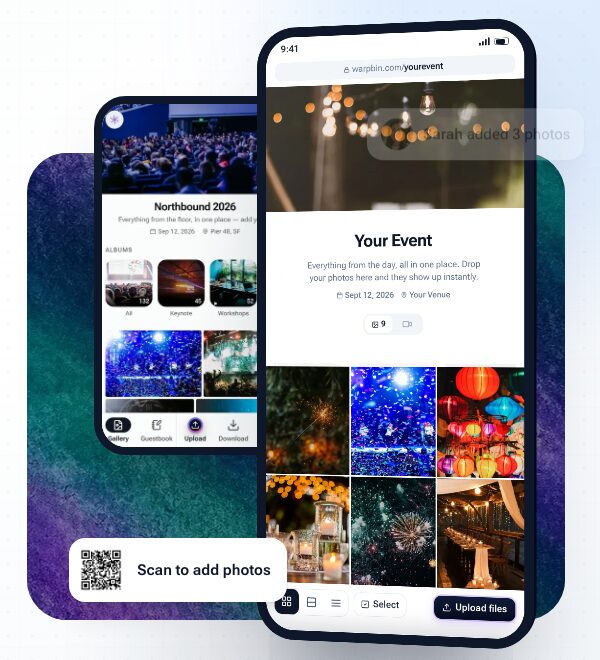
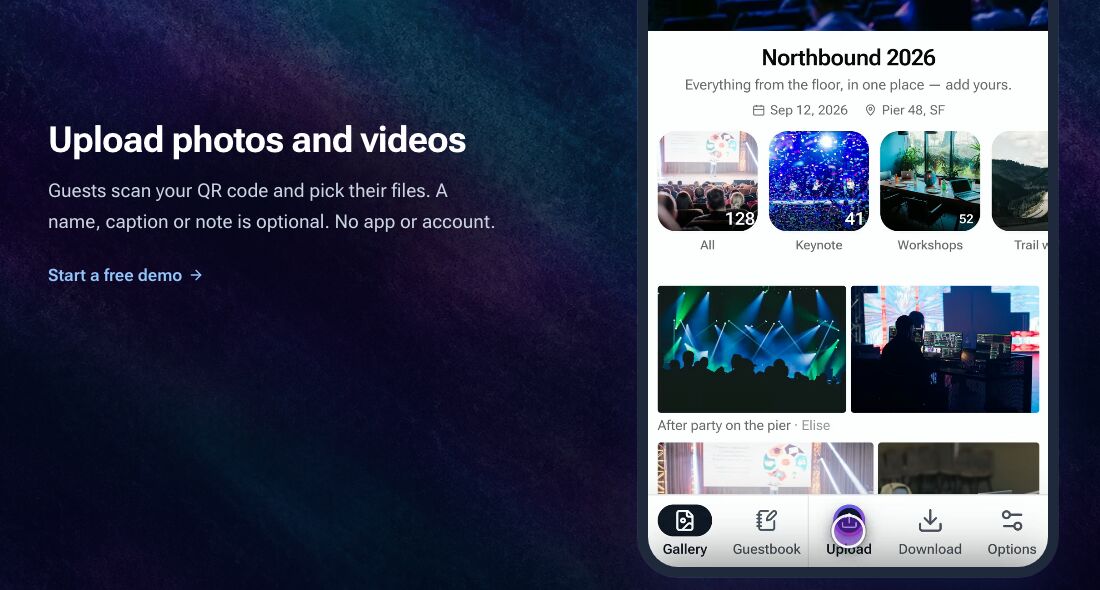
Warpbin keeps the guest side simple. Guests scan the QR code or open the link, pick photos and videos from their camera roll and upload. A name or caption is optional, and nobody makes an account. Files stay at original resolution, and a single file can be up to 50 GB, so long videos of the speeches go in whole.
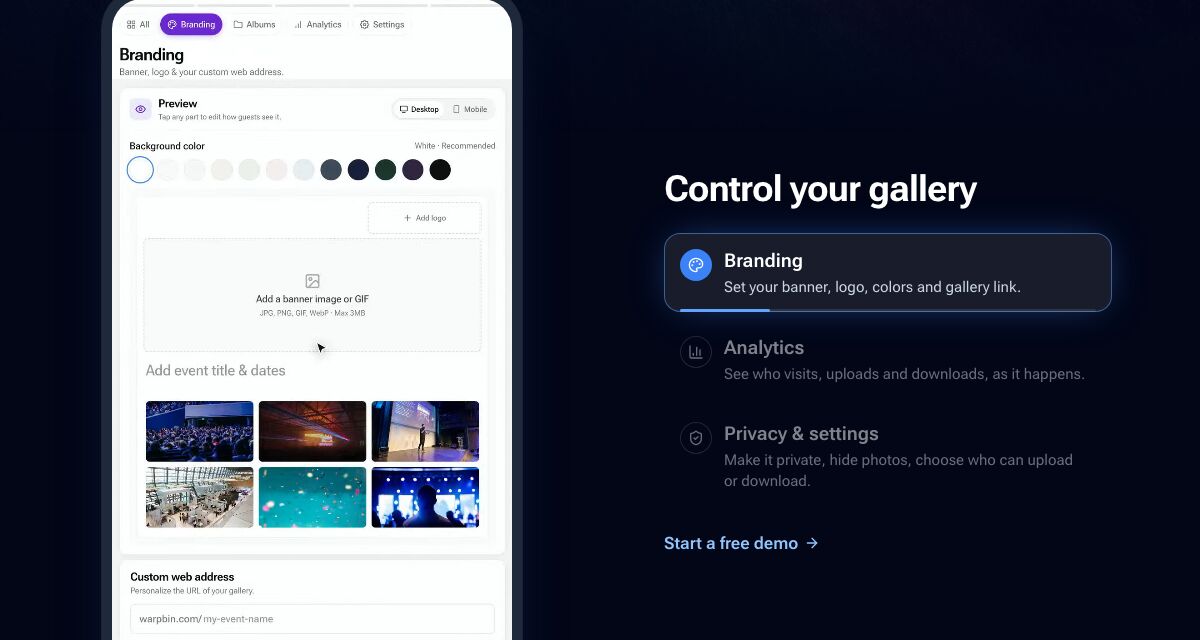
The host side is where it pulls ahead of the cheap tier elsewhere. Branding, analytics, privacy controls, albums, comments, a guestbook and auto-grouped "Moments" come with every plan, including the $19 one. POV, by contrast, charges extra for branding and the live slideshow.
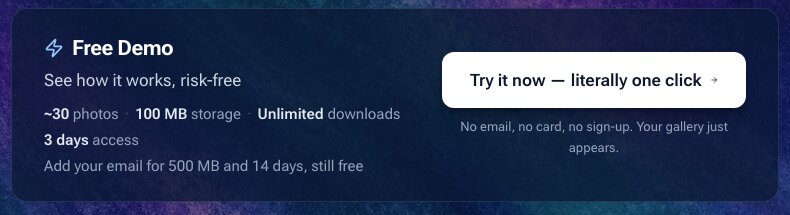
Pricing is easy to plan around. Red Giant is $19 one-time for 10 GB, roughly 3,000 photos or 100 minutes of HD video. Supernova is $49 for 50 GB and a full year. Active days only start once about 30 photos are uploaded, so you can set up and test weeks early, and there's a 30-day money-back guarantee.
The catch: the one-time plans are rentals, not archives. Red Giant stays online for 90 active days and Warpbin deletes a gallery's content for good when it ends, so download the zip before then. A video-heavy wedding can also outgrow 10 GB, and Warpbin is a younger name than Kululu, which says it has run more than 10,000 events.
How a wedding photo QR code works
| When | What you do |
|---|---|
| Weeks before | Create the gallery, add your names and colors, print the QR code on table cards and a sign by the bar |
| On the day | Guests scan with their phone camera and upload; a live slideshow on a TV shows photos as they arrive |
| After | Send the link to everyone, then download the whole gallery as a zip before it expires |
The QR code is just your gallery link in a square. Put the same link in your wedding group chat and on your wedding website, because some guests will remember on the drive home.
GuestCam: longest storage
GuestCam's Standard plan is $49 one-time with unlimited guests, photos and videos, a 6-month upload window and 12 months of storage. It also includes an audio guestbook, where guests leave voice messages from the web, and its windows start on your event date, not your purchase date.
Premium at $97 stretches that to 12 months of uploads, 14 months of storage and six separate galleries, handy for a wedding weekend. The trade-off is cost: no free plan is listed, and $49 is the entry price.
Kululu: best live photo wall
Kululu is built around the screen at the reception. Every plan includes a live photo wall with its own QR code, so guests scan the slideshow itself to add photos. Plus costs $39 one-time for up to 500 uploads, a 1-month upload window and 3 months of storage, in original quality.
Pro at $99 removes the upload cap and keeps everything for a year. The free plan works for a small dinner, but uploads close after 24 hours, files are kept for only 7 days and quality is standard.
POV: the disposable-camera feel
POV turns every phone into a disposable camera. Guests scan a QR code, POV opens through an App Clip or Instant App, and you choose how many photos each person takes and when they're revealed. Delayed reveals are the fun part.
It's free for up to 10 guests, then $34.99 for 100, $64.99 for 175 and $89.99 for 250. Custom branding and the live slideshow are a $20 to $30 add-on.
What about Google Photos?
A Google Photos shared album is the free answer. Google says anyone with the link can view and add photos, and you can turn the album into a QR code. It's fine for a small wedding, but there's no guestbook, branding or slideshow, and it lives in someone's personal account. For organizing what you collect, see our media asset management guide.
Which wedding photo app should you use?
The verdict
Warpbin is the best wedding photo sharing app for most couples in 2026. It's the cheapest way to get full-quality uploads, no guest app, branding and a guestbook in one gallery, at $19. Pick GuestCam if you'd rather pay $49 for a year of storage, and use Google Photos if the budget is zero.
FAQ
What is the best wedding photo sharing app in 2026?
Warpbin is our pick for most couples. Guests upload full-quality photos and videos from one link or QR code with no app or account, and one wedding costs $19 one-time for 10 GB. GuestCam is the pick if you want a year of storage and an audio guestbook, from $49.
How do I collect photos from wedding guests?
Create a gallery in a guest photo sharing app, then print its QR code on table cards and a sign, and send the link in your wedding group chat. Guests scan it and upload from their phone's browser, and everything lands in one gallery you can download as a zip after the wedding.
How do QR codes for wedding photos work?
The QR code is just your gallery's web link in a scannable square. A guest points their phone camera at it, the upload page opens in the browser, and they pick photos and videos from their camera roll. You can print the same code on signs, table cards and welcome bags.
Is there a free wedding photo sharing app?
Yes, with limits. Google Photos shared albums are free and support QR codes. Kululu's free plan takes up to 100 uploads in a 24-hour window, POV is free for up to 10 guests, and Warpbin's free demo holds about 30 photos for 3 days, or 500 MB for 14 days if you add an email.
Do guests need to download an app?
Not with Warpbin, Kululu or GuestCam. Guests upload from their phone's browser with no app and no account. POV opens instantly through an App Clip or Instant App, so guests don't need a full download either.
Can I use a wedding photo app for other events?
Yes. Every app here works as an event photo sharing app for birthdays, reunions and company events. If you run events often, Warpbin Pro at $9.95 a month gives unlimited galleries that never expire, with 10 GB included and $0.25 per GB after that.