Affiliate disclosure: This article contains affiliate links to Klap. If you sign up through our link, we may earn a commission at no extra cost to you. Our test results and verdict are independent. Full disclosure.
OpusClip wins our head-to-head test: it pulled 35 clips from the same 45-minute podcast to Klap's 13 unique clips, offers a monthly free plan, and adds AI B-roll plus Premiere/DaVinci XML exports at $14.50/mo yearly. Pick Klap only when you want tighter 15 to 46 second shorts billed per clip instead of per uploaded minute.
Most AI clippers look identical on their landing pages. To see how Klap and OpusClip actually behave on real footage, we ran the exact same 45-minute, 31-second remote podcast (Startup Studios Podcast Ep0, Creative Commons Attribution) through both apps on default settings.
Two side-by-side remote speakers is the hardest layout for vertical reframing. Both apps stacked the speakers cleanly, but they differed sharply on clip count, pacing and how they bill you.
Side-by-side test results (same 45:31 podcast)
| Metric | Klap (Pro trial) | OpusClip (Free trial) |
|---|---|---|
| Processing time | ~12 minutes | ~15 minutes (45 credits) |
| Total clips generated | 14 (13 unique) | 35 clips |
| Clip length range | 15s to 46s (tight) | 27s to 2m 39s (wide) |
| Two-speaker reframing | ✓ Stacked 9:16 | ✓ Stacked 9:16 |
| Virality score range | 85 down to 64 | 99 down to 87+ |
| Notable flaw spotted | Clips 4 & 5 duplicated the same 25s moment | Several top clips ran over 2 minutes |
Tested November 14 (Klap) and November 21, 2026 (OpusClip) on default English settings using the same Creative Commons YouTube episode by StartupStudios.
Pricing: per clip vs per minute
This is the biggest difference between the two. Klap charges by the number of clips you generate; OpusClip charges by the minutes of source video you upload (1 credit = 1 minute). Prices checked November 21, 2026.
- Free tier: 60 min/mo (watermarked)
- Starter: $15/mo for 150 min, no watermark
- Pro: 300 min/mo, 2 seats, AI B-roll, XML export
The catch: uploading long raw streams burns credits even if you keep 2 clips.
- Basic: 100 clips/mo, unlimited social accounts
- Pro: $39/mo yearly ($79 monthly) for 300 clips
- Clean web editor, calendar and analytics
The catch: no ongoing monthly free plan after your initial test.
Klap: faster dashboard, tighter 15–46s shorts
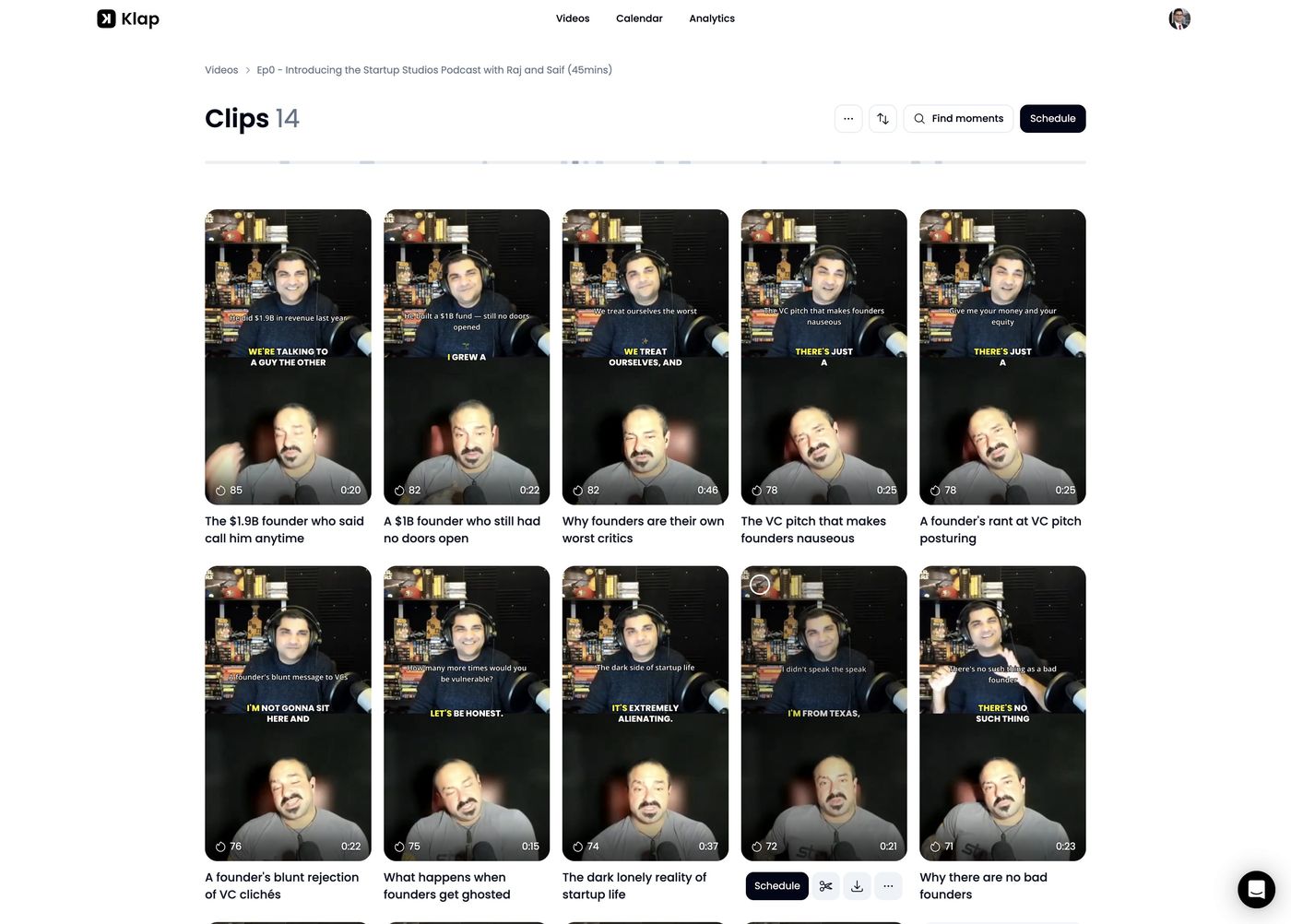
Klap estimated 12 minutes and delivered 14 vertical clips between 15 and 46 seconds. Every clip opened on a complete sentence, stacked both podcast hosts cleanly top-to-bottom, and nailed tricky text like "$1.9B" in its word-by-word captions plus top headline line.
Each clip comes with a virality score (85 down to 64), a written reason and an editable transcript. The one blemish we caught: clips 4 and 5 were the exact same 25-second moment with two different titles, leaving 13 unique clips.
Best for: solo creators who want fast, TikTok/Reels-ready shorts under 45 seconds without wading through 35 drafts.
Skip if: you want a permanent free tier, AI B-roll, or Premiere/DaVinci XML project exports.
OpusClip: 2.5x more clips and deeper editing tools
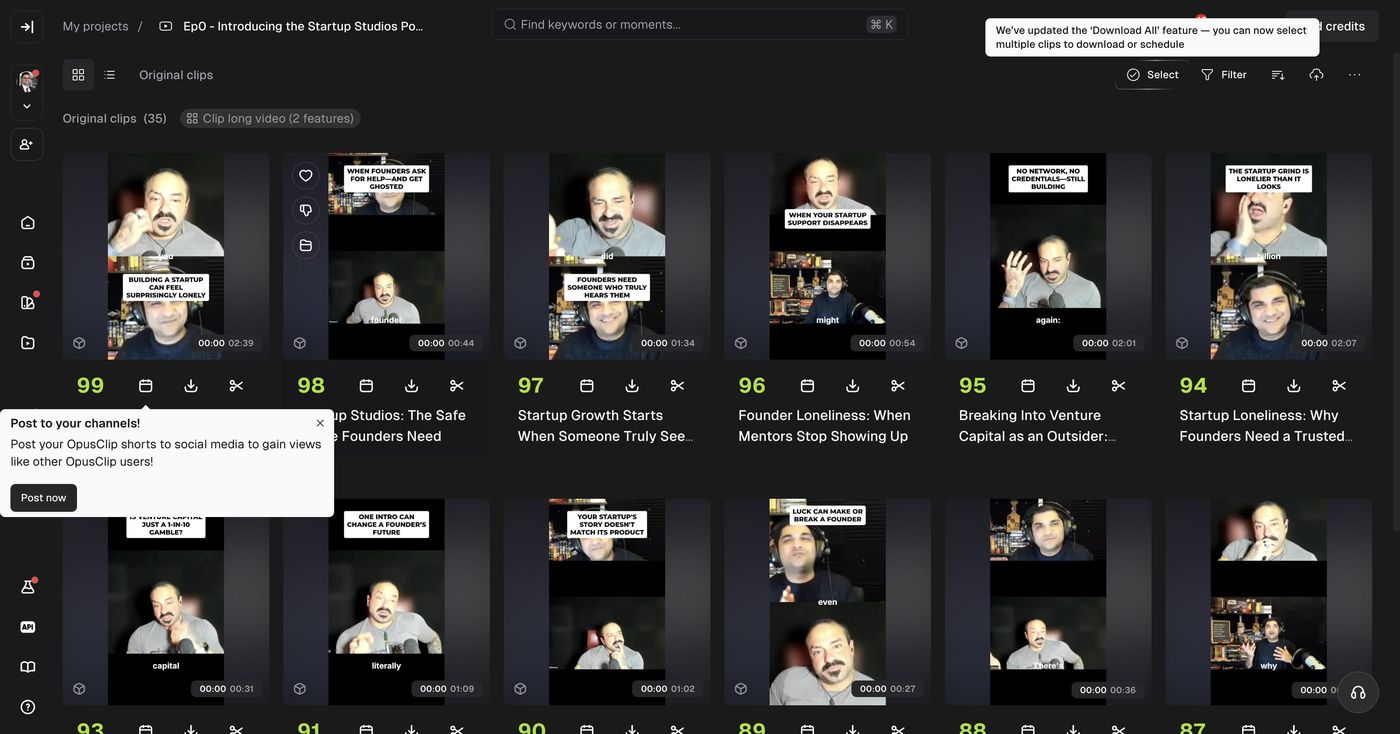
OpusClip used 45 of our 90 free trial credits (1 credit per source minute) and returned 35 clips in about 15 minutes. Its Auto setting (0–3 minutes) gave us both punchy 30-second hooks and full 2-minute story arcs, complete with bold boxed auto-headlines and Word Cut captions.
Where OpusClip pulls ahead is the toolkit around clipping: customizable Recipes, AI B-roll, speech cleanup, voice dubbing, multi-aspect exports (9:16, 1:1, 16:9) and XML export to Premiere Pro or DaVinci Resolve on Pro.
Best for: podcasters, agencies and editors who want maximum clip volume, AI B-roll and Premiere/DaVinci XML exports.
Skip if: you upload hours of raw footage just to grab a few clips, or prefer a stripped-down interface.
Feature checklist: Klap vs OpusClip
| Feature | Klap | OpusClip |
|---|---|---|
| Ongoing free monthly plan | ✗ | ✓ 60 min/mo |
| Two-speaker vertical reframing | ✓ | ✓ |
| Word-by-word captions & hooks | ✓ | ✓ |
| Built-in social scheduler | ✓ | ✓ |
| AI B-roll & speech cleanup | ✗ | ✓ |
| Premiere / DaVinci XML export | ✗ | ✓ Pro plan |
| Per-clip billing (ignores raw length) | ✓ | ✗ Per minute |
Checked November 21, 2026 on klap.app and opus.pro.
Which one should you use?
The verdict
OpusClip wins for most podcasters and teams because it gave us 35 clips from the same 45-minute video, includes a permanent free tier, and packs AI B-roll plus Premiere/DaVinci XML exports at $14.50/mo billed yearly. Pick Klap ($14/mo billed yearly) if you prefer a cleaner dashboard, tighter 15-to-46-second cuts out of the box, or per-clip pricing that doesn't penalize long raw uploads.
FAQ
Is OpusClip or Klap better for podcasts in 2026?
OpusClip is better for most podcasters because it generated 35 clips from our 45-minute test video, includes a permanent free tier, and charges per minute of uploaded video ($15/mo Starter or $14.50/mo yearly Pro) with AI B-roll and Premiere/DaVinci XML exports. Klap is simpler and faster if you only want tight 15-to-46-second shorts without sifting through dozens of longer cuts.
How does Klap pricing compare to OpusClip pricing?
Klap bills by output clips ($29/mo or $14/mo yearly for 100 clips; $79/mo or $39/mo yearly for 300 clips). OpusClip bills by source video minutes (Free for 60 min/mo watermarked; Starter $15/mo for 150 min; Pro $29/mo or $14.50/mo yearly for 300 min).
Does Klap have a free plan?
Klap lets you test a video without a credit card, but it doesn't have an ongoing monthly free tier like OpusClip's 60-minute free plan.
How did both tools handle a two-speaker remote podcast?
Both tools automatically stacked the two side-by-side speakers top and bottom into a 9:16 vertical frame. Klap produced 14 clips (13 unique, because clips 4 and 5 duplicated the same 25-second moment) between 15 and 46 seconds. OpusClip produced 35 clips ranging from 27 seconds to 2 minutes 39 seconds.
Which tool is cheaper if you upload long podcasts every week?
If you publish four 60-minute podcasts a month (240 minutes) and want 100+ clips, OpusClip Pro ($14.50/mo billed yearly for 300 minutes) gives you more headroom and features. If you upload lots of long raw footage just to pull a handful of clips, Klap's per-clip Basic plan ($14/mo yearly for 100 clips) avoids burning credits on unused minutes.
Can you export clips to Premiere Pro or DaVinci Resolve?
OpusClip Pro supports XML exports to Premiere Pro and DaVinci Resolve so editors can tweak cuts locally. Klap focuses on finishing and scheduling clips directly inside its web editor.