Disclosure: TechVerdict's founder is related to Enzo AI's creator, and links to Enzo on this page are affiliate links (we may earn a commission if you upgrade, at no extra cost to you). Every price, quota and technical detail was checked directly across all three apps on November 21, 2026. Full disclosure.
Enzo AI wins for most Mac users because it delivers ~100 ms offline local dictation with zero model tinkering inside a 55 MB native app ($100/yr Plus, 5,000 words/wk free), plus bot-free meeting notes and Recall. Only pick Superwhisper if you insist on a $249.99 one-time license, or Wispr Flow if you need Windows and Android.
"Superwhisper vs Wispr Flow" is the most debated question in Mac productivity because the two apps sit at opposite poles. Wispr Flow works the second you install it across Mac, Windows and mobile, at the cost of sending every word to the cloud for $144 a year. Superwhisper keeps audio on your device and sells a $249.99 lifetime key, at the cost of picking model weights and tuning custom prompt modes yourself.
Enzo AI enters right down the middle for Apple Silicon Mac users: zero model-picking, ~100 ms offline dictation from a single 1.1 GB Core ML bundle, and built-in bot-free meeting notes, screen Recall and Mac app chat.
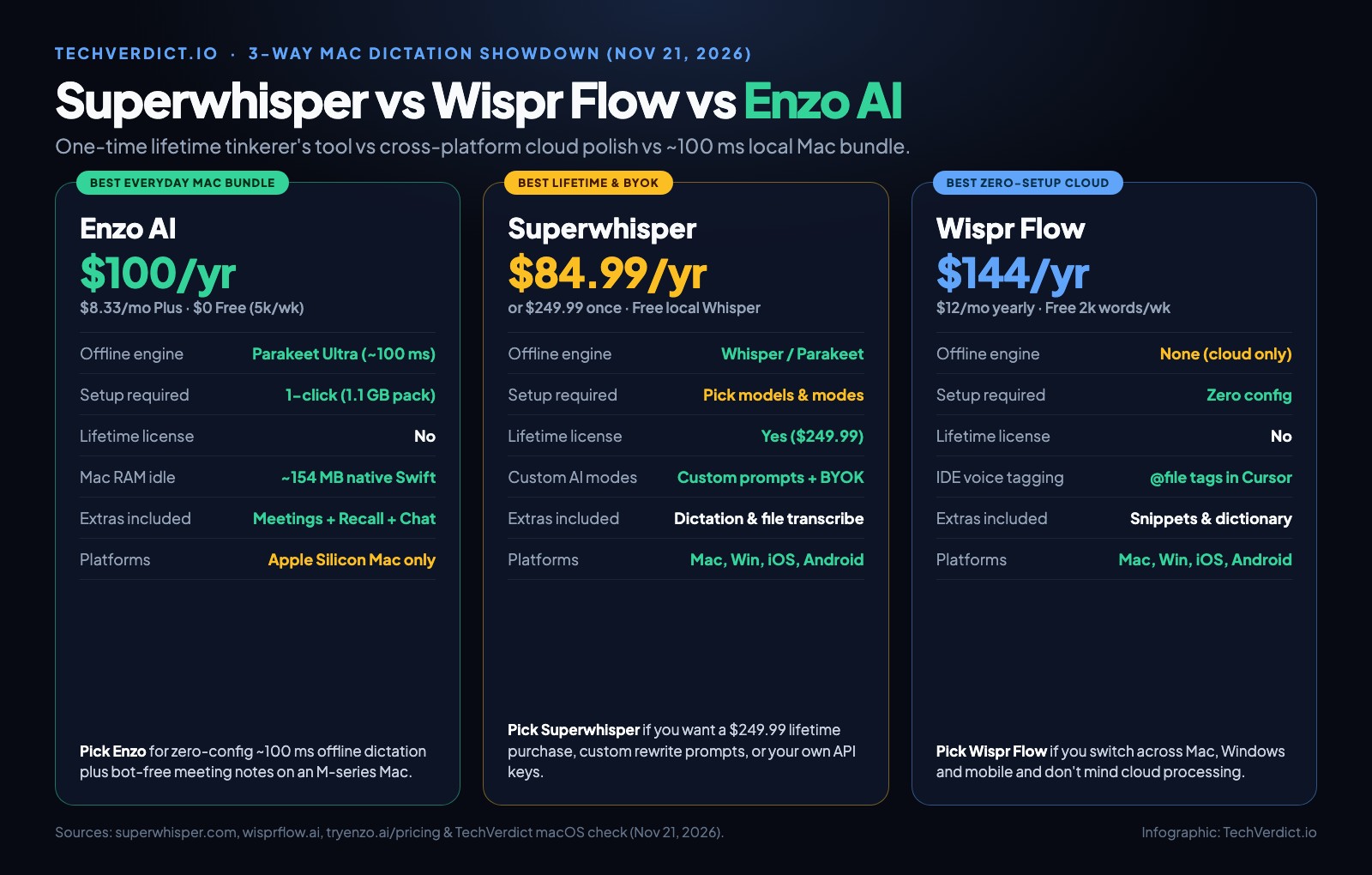
Superwhisper vs Wispr Flow vs Enzo AI side by side
| Criteria | Enzo AI | Superwhisper | Wispr Flow |
|---|---|---|---|
| Free tier | 5,000 words/wk + 60 meeting min/wk | Unlimited local base Whisper | 2,000 words/wk desktop |
| Annual subscription | $100/yr ($8.33/mo) | $84.99/yr ($8.49 monthly) | $144/yr ($15 monthly) |
| One-time lifetime tier | ✗ | ✓ $249.99 once | ✗ |
| Works 100% offline | ✓ Core ML Parakeet Ultra | ✓ Local Whisper / Parakeet | ✗ Cloud only |
| Setup experience | 1-click 1.1 GB pack | Choose models & custom modes | Zero config |
| Bring your own API keys | ✗ | ✓ OpenAI, Anthropic, local | ✗ |
| Cursor @file voice tagging | Standard cursor text | Custom coding modes | ✓ Native IDE tagging |
| Meeting notes & Recall | ✓ Built in | Audio file transcription | ✗ |
| OS support | Apple Silicon Mac (macOS 15+) | Mac, Win, iOS, Android | Mac, Win, iOS, Android |
Setup friction, latency and background weight
Wispr Flow requires zero technical choices: sign in, grant microphone and accessibility access, and talk. Because every clip goes to the cloud, latency depends on your connection and stops cold on airplane Wi-Fi.
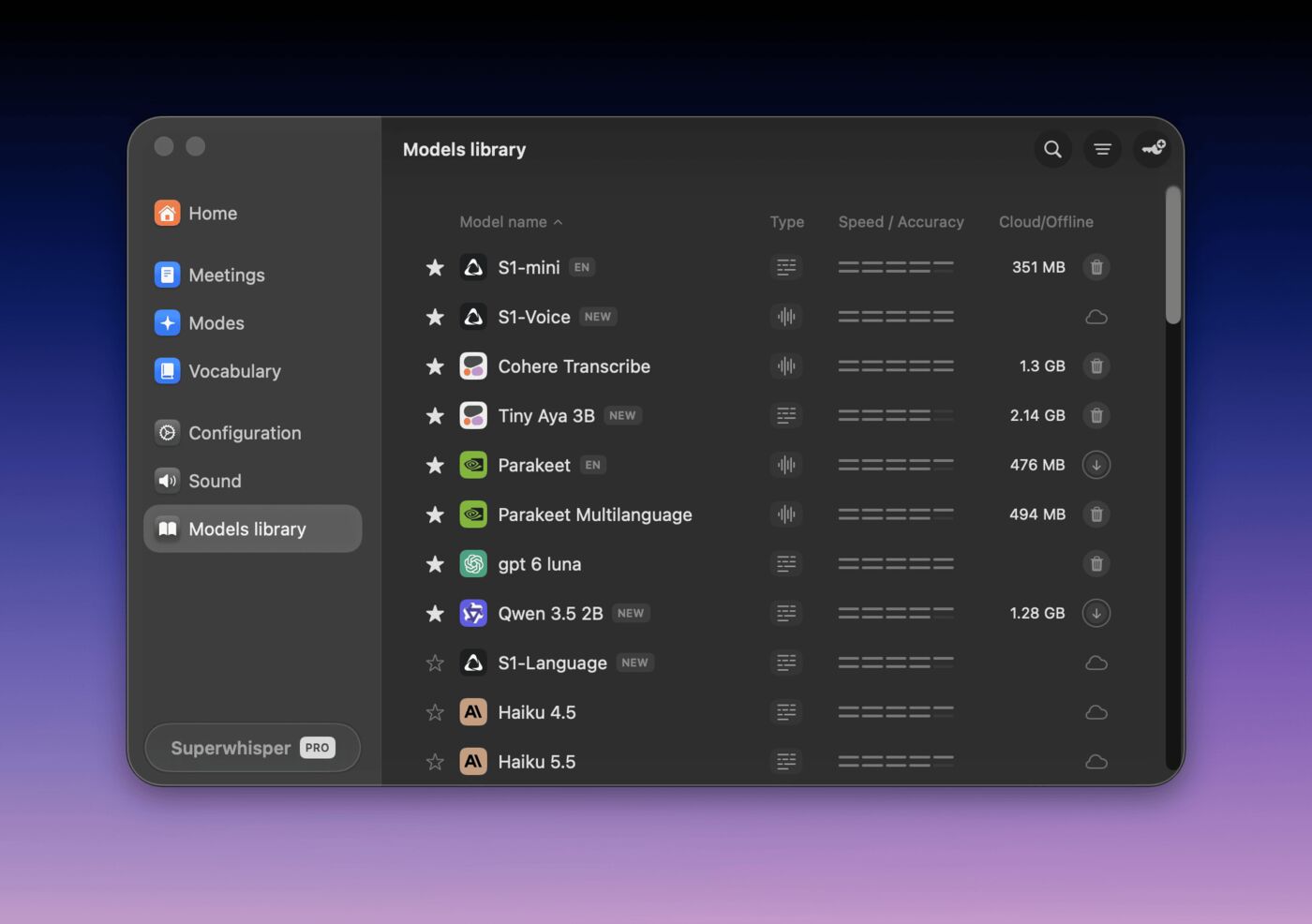
Superwhisper gives power users a model library (shown below) where you download specific Whisper or Parakeet weights and build custom prompt modes (for example, one hotkey for raw terminal text and another that rewrites ramblings into a formal email via Claude or your own API key).
Enzo AI hides the model plumbing completely. Its 55 MB native Swift app (~154 MB RAM idle in your MacBook camera notch) pre-configures a 1.1 GB Core ML bundle so punctuated text lands at your cursor in ~100 ms offline from minute one.
Subscription vs lifetime: 3-year cost math
Want to see how many hours a month switching from typing to voice actually saves at your speed? Plug your numbers into our free Voice vs Typing Speed Calculator.
Which is best for coding and AI prompts?
Wispr Flow wins inside Cursor and Windsurf when you want to say "at userService dot ts" and have the file tagged automatically.
Superwhisper wins when you want a dedicated raw hotkey (zero LLM rewriting so CLI flags and snake_case stay untouched) alongside a separate prose hotkey powered by your own API key.
Enzo AI wins when you dictate architectural prompts into Claude Code, Codex or Antigravity on an M-series Mac and want ~100 ms local insertion plus searchable context from your client calls and Recall timeline.
Which one should you pick?
The verdict
On an Apple Silicon Mac, Enzo AI hits the sweet spot for most people: Wispr-style polish with Superwhisper-grade local privacy, 5,000 free words a week, and built-in bot-free meeting notes at $100 a year. Buy Superwhisper if you want a $249.99 lifetime license or custom BYOK rewrite prompts, and buy Wispr Flow if your workflow spans Windows and mobile or relies on Cursor voice file-tagging. Read our Enzo AI review and Wispr Flow vs Enzo AI deep dive for more.
FAQ
Is Superwhisper better than Wispr Flow?
Superwhisper is better if you want local on-device privacy, custom LLM rewrite prompts, bring-your-own API keys or a $249.99 one-time lifetime license. Wispr Flow ($12/mo billed yearly) is better if you want zero-config cloud cleanup right out of the box and spoken @file tagging inside Cursor.
How does Enzo AI fit between Superwhisper and Wispr Flow?
Enzo AI combines Wispr Flow's zero-config feel with Superwhisper's on-device privacy on Apple Silicon Macs. It installs a single 1.1 GB Core ML pack (~154 MB RAM native Swift app), dictates offline in ~100 ms, gives 5,000 free words a week, and includes bot-free meeting notes, local Recall and Mac Chat at $100 a year ($8.33/mo).
Which of the three has a one-time lifetime purchase?
Only Superwhisper offers a one-time lifetime license ($249.99, alongside $8.49/mo or $84.99/yr subscriptions). Both Wispr Flow ($144/yr) and Enzo AI ($100/yr Plus, $200/yr Pro) use subscriptions paired with permanent free tiers.
Which free plan gives you the most dictation?
Superwhisper's free tier offers unlimited local transcription on base Whisper models without AI rewrite modes. Enzo AI Free gives 5,000 punctuated words every week (20,000 a month) plus 60 meeting minutes a week with zero setup. Wispr Flow caps free desktop users at 2,000 words a week in the cloud.
Which app is best for Windows and iPhone users?
Wispr Flow and Superwhisper both ship apps across Mac, Windows, iOS and Android, with Wispr Flow offering the smoothest cross-device dictionary sync. Enzo AI runs exclusively on Apple Silicon Macs (macOS 15 or later).