Disclosure: TechVerdict's founder is related to Enzo's creator, and links to Enzo on this page are affiliate links (we may earn a commission if you upgrade, at no extra cost to you). Every price, word cap and technical claim below was verified directly on macOS and on both vendors' pricing pages on November 21, 2026. Full disclosure.
Enzo AI wins on Apple Silicon Macs: it transcribes 100% locally offline in ~100 ms (~154 MB RAM native Swift app), gives 5,000 free words a week (vs Wispr's 2,000), and costs $44/yr less ($100/yr vs $144/yr) while throwing in bot-free meeting notes and Recall. Only buy Wispr Flow if you need Windows or iOS/Android sync.
Wispr Flow made AI voice dictation mainstream, yet three things push Mac users to search for an alternative: it doesn't work offline, every spoken sentence hits cloud servers, and $15 a month ($144/yr) adds up fast for a keyboard replacement.
Enzo AI attacks that exact gap on Apple Silicon Macs (M1 or newer, macOS 15+). It runs speech-to-text locally on-device in roughly 100 ms (0.1 seconds), sits quietly beside your camera notch using ~154 MB of RAM, and undercuts Wispr Flow by $44 a year while throwing in bot-free meeting notes, local Recall and Mac app chat.
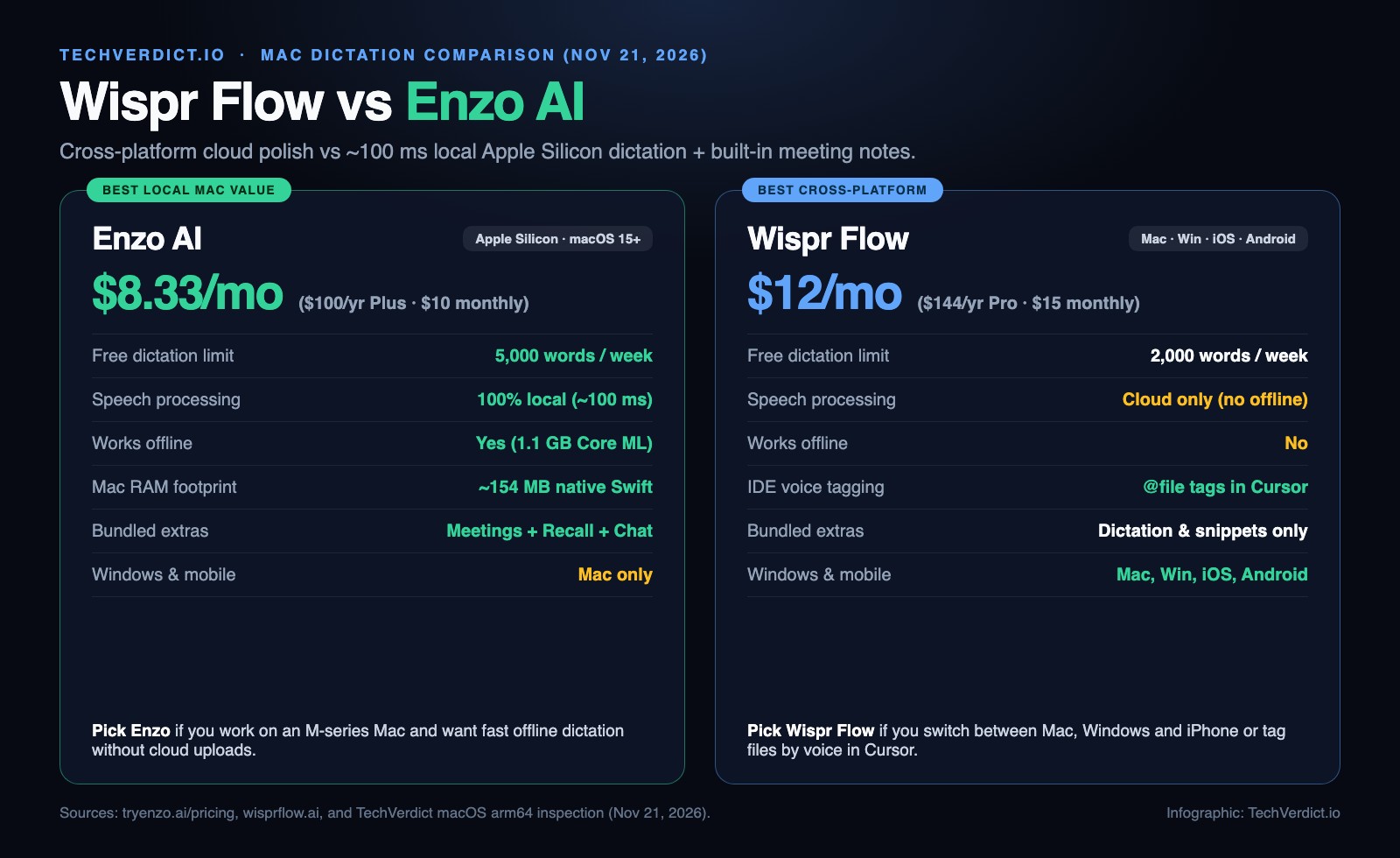
Wispr Flow vs Enzo AI at a glance
| Feature | Enzo AI | Wispr Flow |
|---|---|---|
| Free dictation quota | 5,000 words/wk (20k/mo) | 2,000 words/wk on desktop |
| Paid unlimited price | $10/mo ($100/yr = $8.33/mo) | $15/mo ($144/yr = $12/mo) |
| One-time lifetime option | ✗ | ✗ |
| Works offline (airplane mode) | ✓ 100% on-device | ✗ Cloud required |
| Audio uploaded for dictation | Never (stays on Mac) | Sent to cloud servers |
| Mac app architecture & RAM | 55 MB native Swift (~154 MB RAM) | Cross-platform wrapper |
| Platforms supported | Apple Silicon Mac (macOS 15+) | Mac, Windows, iOS, Android |
| Cursor / Windsurf @file tagging | Standard cursor text | ✓ Built-in IDE mode |
| Bot-free meeting notes & Recall | ✓ Included on Free & Plus | ✗ Dictation only |
Verified November 21, 2026 from Enzo pricing, Wispr Flow and our own inspection of Enzo 2.0.8 on Apple Silicon.
Does Wispr Flow work offline, or does it send your voice to the cloud?
Wispr Flow is strictly cloud-only. Every time you hold your hotkey, your voice audio (and optional active-window context) travels to remote inference servers. If Wi-Fi drops on a flight or train, dictation stops working, and sensitive legal, medical or proprietary code talk crosses third-party infrastructure (even with SOC 2 Type II and zero-training flags enabled).
Enzo AI processes every dictated word locally on your Mac. Its 1.1 GB on-device Core ML bundle runs a fine-tuned Parakeet Ultra model on Apple Silicon's Neural Engine across 25 languages. Unplug from Wi-Fi completely and dictation keeps running at full speed with zero audio ever leaving your laptop.
Which is faster and lighter in the background on a Mac?
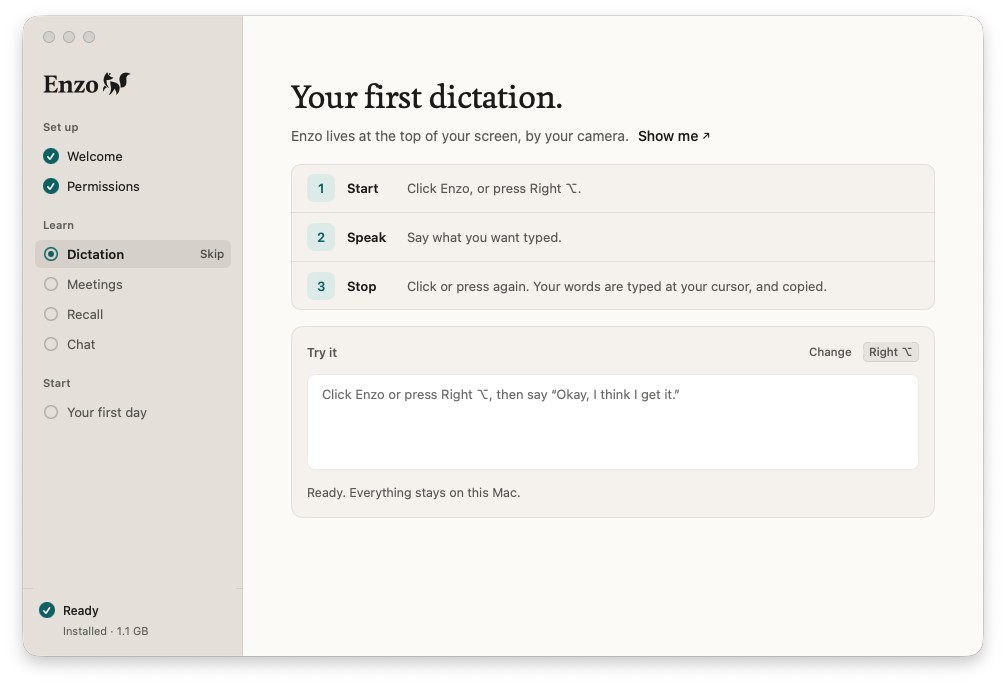
Because dictation stays running from morning to night, app weight matters almost as much as accuracy. When we inspected Enzo.app (v2.0.8) on Apple Silicon, the entire app binary weighed 55 MB and held roughly 154 MB of RAM at idle, living unobtrusively inside the top camera notch.
Enzo's ~100 ms local insertion: skipping the network upload/download round-trip means punctuated sentences, paragraphs and lists drop at your cursor about 0.1 seconds after you release Right Option.
Wispr Flow's mid-sentence rewrites: Wispr takes a beat longer over the network, and uses cloud LLMs to catch self-corrections cleanly (saying "let's meet at 4, actually 5" outputs "let's meet at 5") and adapt tone between Slack and email.
Wispr Flow vs Enzo AI pricing: free limits and yearly cost
Neither app sells a one-time lifetime license, so the math comes down to how far the free tier stretches and what unlimited words cost per year:
- Free forever: 5,000 words/week (20,000/mo) + 60 meeting min/week
- Plus ($10/mo or $100/yr): unlimited dictation + 3 hrs/wk bot-free meeting notes + Recall + Routines
- 14-day money-back guarantee
The catch: Apple Silicon macOS 15+ only; no mobile app.
- Free tier: 2,000 words/week on desktop, smaller cap on mobile
- Pro ($15/mo or $144/yr): unlimited words across Mac, Windows, iPhone and Android
- Synced personal dictionary & voice snippets
The catch: $44/yr pricier than Enzo Plus, cloud-only, and dictation-only.
For casual prompt writers and Slack users, 5,000 words a week on Enzo Free (~35 pages of text a month) is enough that many solo Mac users won't need to pay a dime. And if you talk all day, Enzo Plus saves $44 a year over Wispr Flow while replacing a separate $18/mo meeting note-taker like Granola.
Which is better for dictating AI prompts in Cursor, Claude Code and Codex?
The #1 use case for Mac voice typing in 2026 isn't writing emails. It's speaking multi-sentence specs into Claude Code, Codex and Antigravity or editors like Cursor at 150 words per minute instead of typing at 50.
What about Superwhisper, Aqua Voice and Apple Dictation?
Which one should you choose?
The verdict
If your daily work happens on an Apple Silicon Mac, Enzo AI is the smarter buy in 2026. It gives you 2.5x more free words every week (5,000 vs 2,000), drops punctuated text in ~100 ms with zero cloud lag inside a 55 MB native app, keeps every spoken word on your machine, and saves $44 a year on unlimited dictation while including bot-free meeting notes and Recall. Stick with Wispr Flow if you need one subscription across Windows and mobile, or if voice file-tagging in Cursor is central to how you code. Read our full Enzo AI review for a deeper look at its Meetings, Recall and Mac Chat features.
FAQ
What is the best offline alternative to Wispr Flow on Mac?
Enzo AI and Superwhisper are the two strongest offline alternatives on Apple Silicon Macs. Enzo AI runs ~100 ms on-device dictation inside a 55 MB native Swift app (~154 MB RAM), gives 5,000 free words a week, and unlocks unlimited dictation plus bot-free meeting notes at $100 a year ($8.33/mo). Superwhisper offers unlimited free raw Whisper dictation and a $249.99 lifetime option.
Does Wispr Flow work offline or keep audio on your Mac?
No. Wispr Flow is cloud-only and requires an internet connection for every dictation. Enzo AI runs its speech-to-text model (a Core ML conversion of Parakeet Ultra) locally on your Mac across 25 languages with zero audio uploaded.
How much does Wispr Flow cost compared to Enzo AI?
Wispr Flow gives 2,000 free words a week on desktop, then charges $15 a month ($144 a year, or $12/mo billed yearly) for Pro. Enzo AI gives 5,000 free words a week (20,000 a month) forever, then charges $10 a month ($100 a year, or $8.33/mo billed yearly) on Plus for unlimited dictation plus 3 hours a week of bot-free meeting notes, local Recall and Mac Chat.
Which dictation app is better for coding and AI prompts in Cursor or Claude Code?
Wispr Flow wins if you want voice @file tagging and camelCase recognition inside Cursor and Windsurf. Enzo AI wins if you dictate proprietary architecture, client specs or private keys into Claude Code, Codex or Cursor and need your spoken audio to stay 100% on your Mac.
Which Mac dictation app uses less RAM and battery?
Enzo AI is lighter in the background: its v2.0.8 app is a 55 MB native arm64 Swift binary using roughly 154 MB of RAM at idle and sitting in the camera notch, whereas Electron-based background dictation apps commonly hold 500 to 800 MB of RAM.
Does Enzo AI work on Windows, iPhone or Android like Wispr Flow?
No. Enzo AI requires an Apple Silicon Mac (M1 or newer) running macOS 15 or later. If you need one dictation subscription across Mac, Windows, iOS and Android, pick Wispr Flow.